Using Prosperous Universe Data with Golang
Using Prosperous Universe Data with Golang#
There are many different wants to interact with data the universe. Spreadsheets are commonplace but sometimes more logic is needed than what a spreadsheet can provide.
In this guide, let’s look at how to integrate a portal into the universe’s data, called FIO, with a programming language; specifically, Golang. The FIO team is generous enough to provide an API for which we can build applications on.
NOTE: We realize that the code snippets below contain ≠ instead of ! =. This is due to the syntax highlighter being used and we’re looking for a workaround. The code will copy/paste correctly, preserving the proper Golang ! = (no space).
Prerequisites#
This guide assumes you have knowledge of Golang programming. Note that the main tool that is used in this guide, called Swagger, is available for many programming languages.
If you’d like a demo or guide for a specific programming language, please reach out to our CEO @bitrunnr on the Unified Factions Operations Discord or in a private comm buffer.
Demo Application Overview#
The demo application we’ll build will do the following:
- Command line interface
- Query FIO for list of Local Market orders at specific location
- Filter orders for specific resource
- Run on interval (e.g. every minute)
- Send a desktop notification when changes occur at the given LM for that material
Development Steps#
Setup#
Create your project directory and initialize go:
$ mkdir ~/code/prun-fio-demo
$ cd ~/code/prun-fio-demo
$ go mod init mydemo
Create OpenAPI definition#
This file below, fio-lm.yaml, will describe the API and is used to generate your API client. This will save a lot of time later and prevent you from having to write client-server communication code by hand which is error prone.
This is a big chunk of code to start off with! Feel free to scroll past, just glancing at it for now. But, this is where you would likely start when developing your own application.
The code below was originally based on the official FIO Rest API YAML found here. The sections that aren’t used were removed and we ended up with this:
swagger: "2.0"
info:
  description: |
    FIO REST API.
  version: "1.0.0"
  title: "FIO API"
  contact:
    name: "Saganaki"
  license:
    name: "MIT License"
    url: "https://choosealicense.com/licenses/mit/"
host: "rest.fnar.net"
basePath: "/"
tags:
- name: "localmarket"
  description: "Local Market information"
- name: "planet"
  description: "Planet information"
schemes:
- "https"
paths:
  # ==== Local Market Ads ==== #
  /localmarket/planet/{Planet}:
    get:
      tags:
        - "localmarket"
      summary: "Retrieves LocalMarket data for provided Planet"
      operationId: "getAdsAt"
      parameters:
        - name: "Planet"
          in: "path"
          description: |
            Can be any of the following:
            1) PlanetId
            2) PlanetNaturalId
            3) PlanetName
          required: true
          type: "string"
      responses:
        "200":
          description: "Successfully retrieved payload.  See FIORest source for payload definition"
          schema:
            $ref: "#/definitions/Ads"
        "204":
          description: "Provided Planet not found or no ads present"
definitions:
  Ads:
    type: "object"
    properties:
      BuyingAds:
        type: "array"
        items:
          $ref: "#/definitions/BuySellAd"
      SellingAds:
        type: "array"
        items:
          $ref: "#/definitions/BuySellAd"
  BuySellAd:
    type: "object"
    properties:
      ContractNaturalId:
        type: integer
      PlanetId:
        type: string
      PlanetNaturalId:
        type: string
      PlanetName:
        type: string
      CreatorCompanyId:
        type: string
      CreatorCompanyName:
        type: string
      CreatorCompanyCode:
        type: string
      MaterialId:
        type: string
      MaterialName:
        type: string
      MaterialTicker:
        type: string
      MaterialCategory:
        type: string
      MaterialWeight:
        type: number
      MaterialVolume:
        type: number
      MaterialAmount:
        type: integer
      Price:
        type: number
      PriceCurrency:
        type: string
      DeliveryTime:
        type: integer
      CreationTimeEpochMs:
        type: integer
      ExpiryTimeEpochMs:
        type: integer
      MinimumRating:
        type: string
Generate the Client Code#
We’ll assume you have go-swagger installed which provides the swagger command used below.
$ mkdir -p pkg/fio
$ swagger generate client -A fio -t pkg/fio -f ./fio-lm.yaml
$ go mod tidy
At this point, assuming no failures, you should have a lot of generated code inside of your ./pkg/fio directory.
First Pass#
Let’s keep the application simple at first. Below is the code to take 2 command line inputs and use them to query a local market:
- Planet name (e.g. Katoa)
- Material Ticker (e.g. SF or OVE)
Here’s an example command and its output:
$ go build -o demo
$ ./demo Katoa OVE
Found 1 buy and 2 sell ads for OVE at Katoa
Below is the code in main.go. I’ve left inline comments to explain each step.
You can also download the full project for this first pass right here.
package main

import (
	"context"
	"fmt"
	"os"

	"mydemo/pkg/fio/client"
	"mydemo/pkg/fio/client/localmarket"
	"mydemo/pkg/fio/models"
)

func main() {
	// Validate argument count
	if len(os.Args) != 3 {
		fmt.Println("Must provide a planet name and resource ticker")
		fmt.Printf("Example: %s Katoa SF\n", os.Args[0])
		os.Exit(1)
	}

	// Extract arguments
	planet := os.Args[1]
	material := os.Args[2]

	// Use the API client generated by swagger
	fioc := client.Default.Localmarket

	// Get all ads from given planet. GetAdsAt was generated by swagger.
	ok, empty, err := fioc.GetAdsAt(&localmarket.GetAdsAtParams{
		Planet:  planet,
		Context: context.TODO(),
	})

	// Something went wrong calling to FIO
	if err != nil {
		fmt.Println(err)
		os.Exit(2)
	}

	// No ads at all. Probably a planet name type.
	if empty != nil {
		fmt.Printf("No ads at %s (is planet name correct?)\n", planet)
		os.Exit(2)
	}

	var matchingBuy []*models.BuySellAd
	var matchingSell []*models.BuySellAd

	// Filter Buy Ads
	for _, ad := range ok.GetPayload().BuyingAds {
		if ad.MaterialTicker == material {
			matchingBuy = append(matchingBuy, ad)
		}
	}

	// Filter Sell Ads
	for _, ad := range ok.GetPayload().SellingAds {
		if ad.MaterialTicker == material {
			matchingSell = append(matchingSell, ad)
		}
	}

	// Print the summary
	fmt.Printf("Found %d buy and %d sell ads for %s at %s\n", len(matchingBuy), len(matchingSell), material, planet)
}
Second Pass (Polling)#
In the second pass, we’ll make the application so it runs forever, polling every minute for new data.
There aren’t too many changes here. The code that pulls the matching ads is moved into its own function: getAds. Then, an infinite loop is added that calls the new getAds function along with a 1 minute sleep.
Here’s an example command and its output. Note the change in sell ads over the minute:
$ go build -o demo
$ ./demo Katoa OVE
Wed, 11 May 2022 20:53:01 MDT > Found 1 buy and 2 sell ads for OVE at Katoa
Wed, 11 May 2022 20:54:01 MDT > Found 1 buy and 0 sell ads for OVE at Katoa
Below is the code in main.go. I’ve left inline comments to explain each step.
You can also download the full project for this second pass right here.
package main

import (
	"context"
	"fmt"
	"os"
	"time"

	"mydemo/pkg/fio/client"
	"mydemo/pkg/fio/client/localmarket"
	"mydemo/pkg/fio/models"
)

func main() {
	// Validate argument count
	if len(os.Args) != 3 {
		fmt.Println("Must provide a planet name and resource ticker")
		fmt.Printf("Example: %s Katoa SF\n", os.Args[0])
		os.Exit(1)
	}

	// Extract arguments
	planet := os.Args[1]
	material := os.Args[2]

	// Loop forever
	for {
		// Get the matching buy ads (b), sell ads (s), and any error
		b, s, err := getAds(planet, material)

		if err != nil {
			// Show the error if we hit one
			fmt.Println(err)
		} else {
			// Print the summary along with the time so user can keep track
			now := time.Now().Format(time.RFC1123)
			fmt.Printf("%s > Found %d buy and %d sell ads for %s at %s\n", now, len(b), len(s), material, planet)
		}

		// Time to sleep
		time.Sleep(1 * time.Minute)
	}
}

func getAds(planet, material string) ([]*models.BuySellAd, []*models.BuySellAd, error) {
	// Use the API client generated by swagger
	fioc := client.Default.Localmarket

	// Get all ads from given planet. GetAdsAt was generated by swagger.
	ok, empty, err := fioc.GetAdsAt(&localmarket.GetAdsAtParams{
		Planet:  planet,
		Context: context.TODO(),
	})

	// Something went wrong calling to FIO
	if err != nil {
		return nil, nil, err
	}

	// No ads at all. Probably a planet name type.
	if empty != nil {
		return nil, nil, fmt.Errorf("No ads at %s (is planet name correct?)\n", planet)
	}

	var matchingBuy []*models.BuySellAd
	var matchingSell []*models.BuySellAd

	// Filter Buy Ads
	for _, ad := range ok.GetPayload().BuyingAds {
		if ad.MaterialTicker == material {
			matchingBuy = append(matchingBuy, ad)
		}
	}

	// Filter Sell Ads
	for _, ad := range ok.GetPayload().SellingAds {
		if ad.MaterialTicker == material {
			matchingSell = append(matchingSell, ad)
		}
	}

	return matchingBuy, matchingSell, nil
}
Third Pass (Notify)#
Finally, in the third pass, we will add notifications to the application. Instead of just printing updates to the terminal, we will send notifications to the desktop! Check out this screenshot:
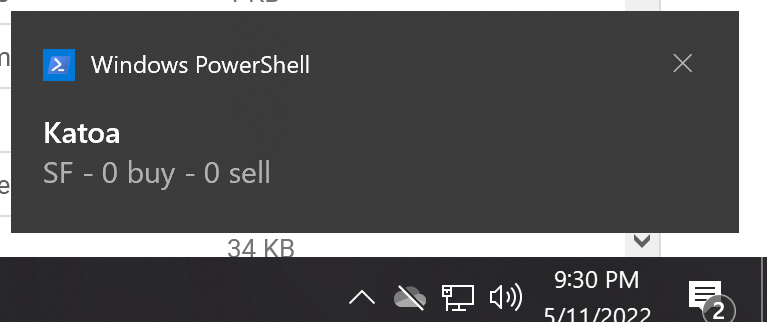
There are many different ways to determine what warrants a notification. For example, do you only want notifications on new ads? What about just a change in count of matching ads? What about when ads are removed from the local market?
We’ll keep it simple in this demo and only notify when the number of ads change. For instance, if we notice the number of ads for OVE drops from 3 -> 2 then we shall notify.
Before looking at the code, note that we’ll be introducing a new library called beeep for handling notifications. Its cross-platform so should work on windows, mac, and linux. Especially note the example command execution below and that you need to run go mod tidy since we’re using a new library!
Here’s an example command but there’s no more output since the notifications are sent to the desktop now!
$ go mod tidy
$ go build -o demo
$ ./demo Katoa SF
Check out the code below. It’s very similar to the secod pass (above) except for a few lines where the notification message is built and fired.
You can also download the full project for this final pass right here.
package main

import (
	"context"
	"fmt"
	"os"
	"time"

	"mydemo/pkg/fio/client"
	"mydemo/pkg/fio/client/localmarket"
	"mydemo/pkg/fio/models"

	"github.com/gen2brain/beeep"
)

func main() {
	// Validate argument count
	if len(os.Args) != 3 {
		fmt.Println("Must provide a planet name and resource ticker")
		fmt.Printf("Example: %s Katoa SF\n", os.Args[0])
		os.Exit(1)
	}

	// Extract arguments
	planet := os.Args[1]
	material := os.Args[2]

	// Last count of ads seen
	lastBuyCount := -1
	lastSellCount := -1

	// Loop forever
	for {
		// Get the matching buy ads (b), sell ads (s), and any error
		b, s, err := getAds(planet, material)

		if err != nil {
			// Show the error if we hit one
			fmt.Println(err)
		} else {
			currentBuyCount := len(b)
			currentSellCount := len(s)

			if currentBuyCount != lastBuyCount || currentSellCount != lastSellCount {
				// Create message
				message := fmt.Sprintf("%s - %d buy - %d sell", material, currentBuyCount, currentSellCount)

				// Deploy the notification!
				err := beeep.Notify(planet, message, "")
				if err != nil {
					fmt.Println(err)
				}
			}

			lastBuyCount = currentBuyCount
			lastSellCount = currentSellCount
		}

		// Time to sleep
		time.Sleep(1 * time.Minute)
	}
}

func getAds(planet, material string) ([]*models.BuySellAd, []*models.BuySellAd, error) {
	// Use the API client generated by swagger
	fioc := client.Default.Localmarket

	// Get all ads from given planet. GetAdsAt was generated by swagger.
	ok, empty, err := fioc.GetAdsAt(&localmarket.GetAdsAtParams{
		Planet:  planet,
		Context: context.TODO(),
	})

	// Something went wrong calling to FIO
	if err != nil {
		return nil, nil, err
	}

	// No ads at all. Probably a planet name type.
	if empty != nil {
		return nil, nil, fmt.Errorf("No ads at %s (is planet name correct?)\n", planet)
	}

	var matchingBuy []*models.BuySellAd
	var matchingSell []*models.BuySellAd

	// Filter Buy Ads
	for _, ad := range ok.GetPayload().BuyingAds {
		if ad.MaterialTicker == material {
			matchingBuy = append(matchingBuy, ad)
		}
	}

	// Filter Sell Ads
	for _, ad := range ok.GetPayload().SellingAds {
		if ad.MaterialTicker == material {
			matchingSell = append(matchingSell, ad)
		}
	}

	return matchingBuy, matchingSell, nil
}
Conclusion#
Vermilion Power (Rearch and Development Division) hopes this serves as a good guide for those that venture outside the world of spreadsheets in our universe. If you have any comments, feedback, or want to tip VMLN with some DW, you can reach our CEO @bitrunnr on the Unified Factions Operations Discord or in a private comm buffer.